Yes, a nanit pro google nest wifi three story house setup absolutely works, but only if you treat the mesh like a backbone, not an afterthought. The Nanit Pro streams 1080p video continuously over 2.4 GHz, and tall, narrow homes punish single-router setups because every floor of drywall, ductwork, and plumbing soaks up signal. A two- or three-node Google Nest Wifi mesh, one node per floor, vertically stacked over a stairwell or central hallway, gives the Nanit camera a strong primary access point on the nursery level plus a clear path back to your phone wherever you are in the house. In this guide we'll walk through node placement, channel settings, gear picks, and which monitor to use if your mesh isn't up to it yet.
Why a three-story house breaks most baby monitors
Top Picks




Even premium Wi-Fi cameras assume a roughly flat, ranch-style footprint. A three-story townhouse or detached colonial is the opposite: short horizontal distances, but a lot of vertical concrete, joists, and HVAC chases between you and the nursery. Signal travels through walls fine, but floors are the killer. A radio on the second floor talking to a router in the basement is fighting through subfloor, joists, and sometimes a layer of poured concrete in the case of older row homes.




The result with a single-router setup is a Nanit Pro that buffers, drops to audio-only, or kicks the live feed back to the loading spinner the moment you walk down to the kitchen. None of that is the camera's fault. It's the link budget. A nanit pro google nest wifi three story house deployment fixes this by giving the camera and your phone strong local nodes on whichever floor each happens to be on, with a fast wireless backhaul between them.

The recommended Nest Wifi layout for three floors
Google Nest Wifi (and Nest Wifi Pro, the Wi-Fi 6E version) is designed around mesh points that share a 5 GHz backhaul. For a three-story home, the cleanest layout is:
- Floor 1 (main floor): Place the primary router here, ideally near where your ISP modem comes in. Center it horizontally, off the floor on a console table, and away from the TV.
- Floor 2 (nursery floor): Place a Nest point in the hallway, not inside the nursery itself. You want it 10–15 feet from the Nanit Pro camera, with line of sight through the open nursery door if possible.
- Floor 3 (primary bedroom/office): Place a third node in a central hallway. This is what keeps the live feed strong when you're already in bed scrolling.
Stack the nodes vertically. If your stairwell is in the middle of the floor plan, place each node within a few feet of it on each floor. The wireless backhaul prefers a clean vertical shot over zig-zagging across the footprint.

Settings to change before you mount the camera
Out of the box, Nest Wifi steers devices automatically and broadcasts one SSID for 2.4 and 5 GHz. That's fine. But for the Nanit Pro in a tall home, a few tweaks help:
- Don't hide the SSID. The Nanit setup app needs to see the network during onboarding.
- Leave band-steering on. Nanit Pro is 2.4 GHz only; Nest will steer it correctly.
- Set a guest network for IoT only if you want isolation, but join the Nanit Pro on your main network during initial setup or the app handshake can fail.
- Add a wired Ethernet backhaul between floors if you can. A single Cat6 run from the basement router up to the second-floor node turns a marginal three-story mesh into a rock-solid one.
Top product picks for a three-story Nanit deployment
Nanit Pro Smart Baby Monitor, Camera & Floor Stand (1080p)
The Nanit Pro is the obvious centerpiece. The Floor Stand version is the right pick for a tall home because it gives you the overhead crib shot, breathing wear tracking, and sleep analytics without drilling a wall mount you'll need to patch later. It's a 2.4 GHz camera, which actually helps in a three-story house because 2.4 GHz penetrates floors better than 5 GHz. Pair it with a Nest Wifi point on the same floor and the live feed stays smooth from any room. Check the Nanit Pro on Amazon.
Owlet Dream Duo (Gen 3) Smart Baby Monitor, 2K HD Video
If you want the wearable sock plus a video feed, the Owlet Dream Duo is the strongest alternative. The 2K camera is also Wi-Fi based, so the same Nest Wifi node placement rules apply, but the sock gives you heart rate and oxygen trends that the Nanit's breathing band can't match in the same way. Best for parents whose anxiety is more about vitals than sleep coaching. See the Owlet Dream Duo on Amazon.
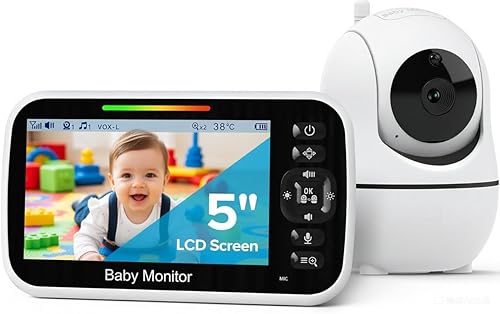
HelloBaby No-WiFi Baby Monitor, 5-inch, 30-Hour Battery, PTZ
Worth keeping as a backup in any tall house. When the ISP goes down or you're rebooting Nest Wifi for a firmware update, a non-Wi-Fi monitor running on its own 2.4 GHz FHSS radio between camera and parent unit keeps you watching the nursery. The 30-hour battery on the parent unit is genuinely useful if your bedroom is two floors above the nursery and you don't want to leave it plugged in. View the HelloBaby on Amazon.
GoodBaby Baby Monitor with Camera & Audio, No WiFi, PTZ
Another solid no-Wi-Fi option, this one with pan-tilt-zoom from the parent unit so you can scan the crib and the rest of the nursery without standing up. In a three-story house, the closed-circuit radio link can actually outperform Wi-Fi when you're at the opposite end of the home, because it doesn't have to traverse a mesh and a phone's network stack. Check the GoodBaby monitor on Amazon.
Quick comparison: which monitor for which floor plan
| Monitor | Connection | Best for | Three-story verdict |
|---|---|---|---|
| Nanit Pro (B0FTSL4FXJ) | 2.4 GHz Wi-Fi | Sleep tracking, overhead view | Best with a proper Nest Wifi mesh |
| Owlet Dream Duo (B0FDSHXWYY) | 2.4 GHz Wi-Fi + sock | Vitals-anxious parents | Same mesh rules; sock works locally |
| HelloBaby PTZ (B09GM8JZM9) | No Wi-Fi (FHSS) | Power outages, ISP redundancy | Reliable backup, limited floor range |
| GoodBaby PTZ (B0GTMC9DS1) | No Wi-Fi (FHSS) | Privacy-first households | Strong on two floors, weak on three |
Where exactly to put each Nest Wifi node
The single biggest mistake we see in a nanit pro google nest wifi three story house setup is putting a Nest node inside the nursery on a low shelf. That kills the backhaul because the radio is now boxed in by the crib, dresser, and a closed door. Instead:
- Hallway corner on the nursery floor, mid-height, with the nursery door cracked open at night.
- Top of a bookshelf in a central living area, not inside an entertainment console.
- Never on the floor. Two feet of elevation makes a measurable difference, especially in finished basements.
- Six feet minimum between any two nodes. Too close and they don't add coverage, they just compete.
After placement, run the Mesh Test in the Google Home app from each floor. You want "Great" on every node. If the second-floor node only shows "Good," move it three feet toward the stairwell and retest.
What about Wi-Fi 6E or Wi-Fi 7 mesh?
Nest Wifi Pro (Wi-Fi 6E) is fine for this job; you don't strictly need Wi-Fi 7 to run a single 1080p baby monitor. The Nanit Pro will only ever talk to your network on 2.4 GHz, so the upgraded bands mainly help your phone, laptop, and TVs. If you're already invested in Nest Wifi (the older AC2200 generation), keep it. If you're buying fresh in 2026, Nest Wifi Pro is the better long-term choice because of the 6 GHz backhaul, which keeps the 5 GHz client band uncongested for everything else in the house.
Troubleshooting a flaky Nanit feed on the third floor
If you've got the mesh dialed in and the feed still stutters when you walk to the top floor, work through this list:

- Open Google Home and check that your phone is connected to the top-floor node, not still clinging to the main router.
- In the Nanit app, switch from "HD" to "Auto" temporarily to see if it's a bandwidth issue or a connectivity issue.
- Reboot the second-floor node only. Often the camera reconnects to a stronger node and stays there.
- Check 2.4 GHz channel congestion using a Wi-Fi analyzer. Three-story homes in dense neighborhoods (rowhouses, condos) often need a manual channel.
- If nothing helps, run Ethernet to the second-floor node and re-test. Wired backhaul almost always fixes residual stutter.
For more on nursery Wi-Fi planning, see our guide on best mesh Wi-Fi for baby monitors and our walkthrough of Nanit Pro setup in older homes.
Frequently Asked Questions
Does the Nanit Pro work on 5 GHz Wi-Fi?
No. The Nanit Pro is a 2.4 GHz-only device. That's actually a feature in a three-story house because 2.4 GHz signals penetrate floors better than 5 GHz. Google Nest Wifi handles the band selection automatically, so you don't need to split your SSID.
How many Nest Wifi points do I need for a three-story home?
Three nodes is the sweet spot: one per floor, vertically stacked over a central stairwell. Two nodes can work for a small townhouse with low ceilings, but for typical 2,500–3,500 sq ft homes spread across three floors, three nodes prevent dead zones on the top and bottom.
Will the Nanit Pro keep recording sleep data if Wi-Fi drops?
The Nanit Pro buffers a short window locally, but extended Wi-Fi outages will create gaps in the sleep analytics in the app. This is one reason to keep a non-Wi-Fi backup like the HelloBaby or GoodBaby PTZ in the nursery for outage nights.
Can I use Google Nest Wifi Pro and the original Nest Wifi together?
No. Google requires all nodes in a mesh to be the same generation. If you're upgrading to Nest Wifi Pro, you'll need to replace all your existing nodes, not mix them. Plan for three Pro nodes if you're going that route in a three-story home.
Is the Owlet Dream Duo a better fit than the Nanit Pro for a tall house?
It depends on what you care about. The Owlet's sock works locally over Bluetooth to its base station, so the vitals feed is independent of Wi-Fi strength in a way the Nanit's breathing band isn't. If your three-story house has chronically weak coverage on the nursery floor, the Owlet's sock is more resilient. Video on either is Wi-Fi dependent.
Where should I plug in the Nanit Pro's power adapter?
Use a wall outlet, not a power strip with surge protection that includes a USB hub. Some surge strips create voltage drops that cause the camera to reboot intermittently. Plug directly into the wall and route the cable behind furniture per Nanit's safe-sleep instructions.
What's the maximum distance between Nest Wifi nodes for a baby monitor feed?
Google rates each node for about 2,200 sq ft, but for camera traffic you should plan tighter than that. In a three-story house, keep nodes within 30–40 feet of each other through floors and walls. The Mesh Test in the Google Home app is the authoritative answer for your specific home, since materials vary so much.
The bottom line
A Nanit Pro can absolutely cover a three-story house, but the camera is only as good as the access point it's connected to. Build the Nest Wifi mesh first, one node per floor stacked vertically, run Ethernet backhaul to the middle floor if you can, then add the Nanit Pro on the nursery floor. Keep a no-Wi-Fi monitor in a drawer for the night your ISP decides to push a firmware update at 2 a.m. Done right, you'll have a stutter-free 1080p feed from the basement laundry room to the top-floor home office, and that's the whole point.
Key Takeaways
- Choosing the right nanit pro google nest wifi three story house means matching capacity and output ports to your actual devices
- Always check actual watt-hours (Wh), not just watts — runtime depends on Wh, not peak output
- Also covers: nanit pro mesh wifi setup
- Also covers: nanit pro weak signal upstairs nursery
- Also covers: nanit pro nest wifi handoff
- Compare price-per-Wh across models to find the best value for your budget