The fastest eufy spaceview pro garage nursery setup for a detached garage conversion goes like this: place the parent unit inside the main house on the wall closest to the garage, mount the camera on the interior garage wall facing back toward the house (not the exterior wall), keep both units off concrete and metal surfaces, charge fully before pairing, and re-pair the units once the camera is in its final mounted position. Because the SpaceView Pro uses a private 2.4 GHz FHSS radio link instead of Wi-Fi, you do not need internet in the garage — but you do need a clean line-of-sight path and a smart range test before the baby sleeps out there.
Why a detached garage nursery is a special case
Top Picks

A detached garage converted into a nursery breaks most of the assumptions baby monitor manufacturers make. The advertised 1,000-foot range on the Eufy SpaceView Pro assumes open-air line of sight — not two exterior walls, an air gap, insulation, drywall, and whatever framing the previous owner left behind. Stucco with metal lath, foil-backed insulation, and aluminum garage siding are the three biggest signal killers in 2026, and any one of them can drop your effective range to 60–80 feet. Before you commit to the SpaceView Pro for a garage conversion, you need to plan the setup around the physical envelope, not the spec sheet.



The good news: because the SpaceView Pro does not rely on Wi-Fi, you do not need to extend your home network into the garage, run a powerline adapter, or worry about cloud outages waking you up at 2 a.m. The radio link is direct, encrypted, and local. That is exactly what makes it a strong candidate for this scenario — if you set it up correctly.
Step-by-step eufy spaceview pro garage nursery setup
1. Survey the path before you mount anything
Stand in the garage where the crib will go, holding the camera unplugged. Walk a straight line back to where the parent unit will live (usually the primary bedroom). Count the walls, note any metal HVAC ducts, and look for foil-faced rigid foam insulation — builders love it on garage conversions because of code requirements, and it acts as a near-perfect RF mirror. If the straight-line path crosses a furnace, water heater, or breaker panel, plan to offset the parent unit by a few feet.
2. Charge and pair indoors first
Fully charge the parent monitor and plug in the camera inside the house, in the same room, before you ever take the camera to the garage. The SpaceView Pro pairs automatically out of the box, but if you bought a refurbished or open-box unit, hold the pairing button on the camera base until the LED blinks, then confirm on the parent unit. Doing this indoors guarantees the link is healthy before walls are involved.
3. Mount the camera on the interior-facing wall
This is the single biggest mistake people make. The instinct is to mount the camera on the exterior wall of the garage (opposite the crib) so it points at the baby. But that puts the antenna pointed at the garage door or the back of the lot — away from the parent unit. Instead, mount the camera on the garage wall that faces the house, angled across the room toward the crib. The antenna inside the camera will then radiate toward your parent unit through the shortest possible wall path.
4. Keep both units off metal and concrete
The SpaceView Pro camera should sit on a wood shelf or a plastic wall mount, not directly on the concrete slab or a metal shelving unit. On the parent side, keep the monitor off granite countertops and away from the refrigerator. A bedside wood nightstand is ideal.
5. Range-test with white noise playing
Before the baby moves out there, put a white-noise machine in the crib at the volume you actually plan to use. Walk through the house with the parent unit and listen. If audio cuts out in your bedroom but works in the kitchen, you have a multipath dead zone and need to nudge the parent unit two or three feet. The SpaceView Pro’s signal-strength bars are conservative — trust the audio, not the icon.

6. Run a 24-hour soak test
Leave the camera running overnight in the empty garage nursery with a stuffed animal in the crib. The next morning, check whether the parent unit logged any “out of range” alerts. Garage temperatures swing more than indoor rooms, and component behavior at 40°F vs. 85°F can change link margin by several dB.
When the SpaceView Pro is not enough: hybrid setups
If your garage is more than 50 feet from the parent bedroom, or if you have a stucco-with-metal-lath build, even a perfectly tuned SpaceView Pro may not give you the reliability you want. In those cases, parents in 2026 are running a hybrid: keep the SpaceView Pro as the primary local-RF link, and add a Wi-Fi camera as a backup that you can pull up on your phone from anywhere in the house. See our guide on extending Wi-Fi to a detached structure for a baby monitor if you want to add a smart camera too.
Comparison: SpaceView Pro vs. alternatives for detached-structure nurseries
| Monitor | Connection | Best for | Garage-conversion fit |
|---|---|---|---|
| Eufy SpaceView Pro | Private 2.4 GHz RF | No-Wi-Fi primary link | Strong if <75 ft, line-of-sight friendly |
| HelloBaby No-WiFi PTZ | Private 2.4 GHz RF | Backup or budget primary | Good — 30-hour battery survives garage outages |
| GoodBaby No-WiFi PTZ | Private 2.4 GHz RF | Pan/tilt coverage | Good — PTZ helps cover odd garage layouts |
| Nanit Pro | Wi-Fi (2.4/5 GHz) | Hybrid backup with sleep tracking | Needs Wi-Fi extended to garage |
| Owlet Dream Duo | Wi-Fi + sock sensor | Vitals tracking backup | Needs Wi-Fi; sock works offline |
Top product picks to pair with your eufy spaceview pro garage nursery setup
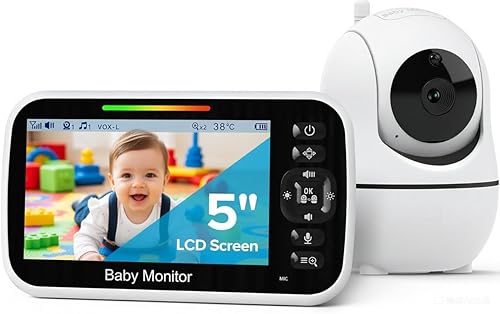
HelloBaby No-WiFi 5-inch PTZ — the redundancy pick
If the SpaceView Pro is your primary, the HelloBaby No-WiFi PTZ is the cheapest sane backup. It uses the same private 2.4 GHz radio approach, has its own 30-hour battery on the parent unit, and pan/tilt/zoom lets you sweep the converted garage from the parent screen without walking outside in the rain. Keep it on a different shelf than the SpaceView and you have two physically independent links to the crib.
Check the HelloBaby No-WiFi PTZ on Amazon
GoodBaby No-WiFi PTZ — the wide-coverage pick
Garage conversions often have awkward floor plans — a crib in one corner, a changing station in another, and a former tool wall along one side. The GoodBaby No-WiFi PTZ’s motorized pan and tilt let you cover the whole converted space from one mounting point, which is helpful when wall studs in a garage are not where you want them. Like the SpaceView, it does not need Wi-Fi.
Check the GoodBaby No-WiFi PTZ on Amazon

HelloBaby 5-inch 2-Camera — the two-zone pick
If your converted garage nursery has a separate play area, or you want one camera on the crib and one on the door for older toddlers who climb out, the two-camera HelloBaby kit lets you split-screen both feeds on one parent unit. The 30-hour battery is the longest in this price range and survives a garage power blip without dropping the link.
Check the HelloBaby 2-Camera kit on Amazon
Nanit Pro — the smart-overlay pick
For parents who want sleep analytics, breathing-motion tracking, and remote phone viewing on top of the SpaceView, the Nanit Pro is the cleanest Wi-Fi add-on in 2026. You will need to extend your home Wi-Fi into the garage (a mesh node or wired backhaul to an access point), but once it is online the Nanit gives you a second, internet-routed view of the same crib.
Owlet Dream Duo — the vitals backup pick
For a detached structure, many parents feel better with a wearable that does not depend on a camera link at all. The Owlet Dream Duo combines a 2K Wi-Fi camera with the Dream Sock, which tracks heart rate and oxygen and alarms on the sock itself even if Wi-Fi drops. In a garage conversion where any single link can fail, this is meaningful peace of mind.
Check the Owlet Dream Duo on Amazon
Power, temperature, and code considerations
Beyond the radio link, three things often catch parents off guard when finishing a garage conversion nursery checklist in 2026. First, the SpaceView Pro camera needs a continuous 5V USB power supply — do not run it off the garage’s old fluorescent fixture circuit if you can avoid it; tie it to a dedicated outlet on a fresh circuit installed during the conversion. Second, if the garage was not insulated to current residential code, the temperature swing will shorten the camera’s lifespan; aim for the room to stay between 60°F and 78°F year-round. Third, many municipalities now require interconnected smoke and CO detectors in any space used for sleeping — the monitor does not replace that.
Final tuning for your eufy spaceview pro garage nursery setup
Once the camera is mounted and the soak test passes, do three last things. Drop the screen brightness on the parent unit to its lowest comfortable setting so a 6-hour overnight viewing session does not drain the battery. Turn on VOX (voice-activated) mode so the screen wakes only when the baby makes noise — this also reduces light pollution in your bedroom. And finally, label the parent unit with the camera’s channel number; if you ever bring a second SpaceView indoors later, you will thank yourself.
For more on smart nursery integration, see our best no-Wi-Fi baby monitors of 2026 roundup.
Frequently Asked Questions
Will the Eufy SpaceView Pro actually reach from a detached garage to the main bedroom?
In most suburban lots with a garage 30–60 feet from the house, yes — provided you avoid foil-backed insulation and metal siding on the signal path. The 1,000-foot spec is open-air; through two exterior walls plan on 60–150 feet of real-world reliability. Always do a 24-hour soak test before the baby sleeps out there.
Do I need Wi-Fi in the garage for the SpaceView Pro to work?
No. The SpaceView Pro uses a private encrypted 2.4 GHz radio link directly between the camera and the parent unit. That is one of the main reasons it is a strong fit for a detached garage nursery in 2026 — your home Wi-Fi never needs to leave the main house for the monitor itself to work.
What if the signal cuts out in just one room of the house?
That is almost always a multipath null — the same RF signal arriving at the parent unit from two reflected paths and canceling itself out. Move the parent unit two or three feet in any direction and the dead spot usually disappears. If it persists, raise the unit higher (above counter height) or rotate it 90 degrees.
Can I use the SpaceView Pro camera outdoors on the garage exterior?
No. The SpaceView Pro camera is not weather-sealed and is not rated for outdoor mounting. It must be mounted inside the converted garage interior. If you need exterior coverage of the path between house and garage, use a separate outdoor security camera, not the baby monitor.
Is a no-Wi-Fi monitor like the SpaceView safer than a Wi-Fi one for a detached nursery?
Safer in the sense that it cannot be remotely hacked over the internet and will not fail if your ISP goes down. However, it also means you cannot check the baby from your phone at work. Many parents in 2026 run a hybrid — SpaceView as the primary local link, plus a Wi-Fi camera for remote viewing.
How long does the SpaceView Pro parent unit battery last during garage use?
Eufy rates it around 9 hours with the screen on and longer in VOX mode. In a garage-conversion scenario where the signal margin is slightly tighter, the radio works a bit harder, so expect closer to 7–8 hours of continuous use. Keep it docked at the bedside overnight.
What backup should I pair with my eufy spaceview pro garage nursery setup?
For pure redundancy on the same radio approach, the HelloBaby No-WiFi PTZ is the most cost-effective second link. For a different failure mode (Wi-Fi-based, phone viewable), the Nanit Pro or Owlet Dream Duo give you a fundamentally independent path to the baby that does not share the SpaceView’s 2.4 GHz radio.
Key Takeaways
- Choosing the right eufy spaceview pro garage nursery setup means matching capacity and output ports to your actual devices
- Always check actual watt-hours (Wh), not just watts — runtime depends on Wh, not peak output
- Also covers: eufy spaceview pro range to garage
- Also covers: baby monitor for converted garage room
- Also covers: eufy spaceview pro long range setup
- Compare price-per-Wh across models to find the best value for your budget