If you live with tinnitus, traditional audio-first baby monitors can be a nightmare: the constant hiss of a one-way speaker layers right on top of your existing ringing, and high-pitched alarm chirps can spike a flare for hours. The good news is that a baby monitor visual alerts for tinnitus parents setup is absolutely possible in 2026. The best picks rely on bright LED sound bars, screen flash alerts, on-phone push notifications with vibration, and split-screen video so you can see your baby fuss before you ever need to hear them. Below are the monitors that work best when your ears need a break.
Quick answer: what to look for in a visual-only baby monitor
Top Picks
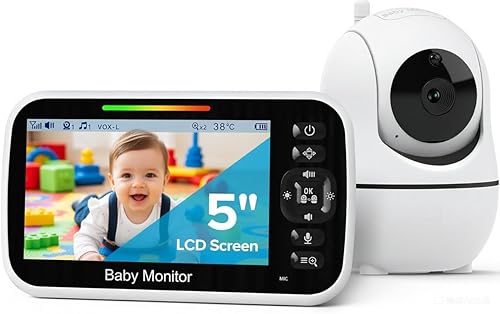
For a true baby monitor visual alerts for tinnitus parents workflow, prioritize four features: (1) a dedicated LED sound-level bar that lights up when the baby cries even with the speaker muted, (2) on-screen flashing border or icon alerts for motion and crying, (3) a parent unit or app that supports phone vibration as the primary alarm, and (4) crisp 1080p or 2K video so subtle cues — eyes opening, a fist in the mouth, a shifted swaddle — are visible at a glance. WiFi-app monitors like Nanit and Owlet add silent push notifications; dedicated handheld units like HelloBaby and GoodBaby give you LED bars without any audio at all.



Comparison: best visual-alert baby monitors for tinnitus-sensitive parents in 2026
| Monitor | Visual alert type | Audio can be muted? | Vibration alerts | Best for |
|---|---|---|---|---|
| Nanit Pro Smart Baby Monitor | App push + screen flash, motion/sound insights | Yes (app-only, no parent unit) | Yes, via phone | Tinnitus parents who prefer silent phone alerts |
| Owlet Dream Duo (Gen 3) | App notifications + sock biometric alerts | Yes | Yes, via phone | Parents wanting health data instead of cry sounds |
| HelloBaby No-WiFi 5-inch PTZ | LED sound bar + screen-on at noise threshold | Yes (volume to zero, LEDs still light) | No (visual only on parent unit) | No-WiFi households, hearing-sensitive parents |
| HelloBaby 5-inch Dual Camera | LED bar + dual split-screen video | Yes | No | Twins or multiple rooms, visual scanning |
| GoodBaby No-WiFi PTZ | LED noise bar + screen wake on sound | Yes | No | Budget visual-first setup |
Why audio-first baby monitors are rough on tinnitus
Most legacy monitors stream constant low-level static from the nursery, which the brain interprets as a high-frequency hum — the exact frequency band where tinnitus tends to sit. Worse, when baby cries, the parent unit defaults to amplifying that cry through a small, tinny speaker. For parents managing tinnitus, that double hit (baseline hiss plus sudden treble) can trigger hours of spike, sleep disruption, and even temporary threshold shift. A visual-only setup eliminates the baseline hiss entirely and replaces the cry trigger with a bright LED bar, a flashing screen border, or a silent vibration on your phone. The result: you still get every alert, but your nervous system gets a break.
Nanit Pro Smart Baby Monitor — best smart visual alerts
The Nanit Pro is the strongest pick for a tinnitus-friendly smart nursery in 2026. There is no parent unit at all — everything routes through the Nanit app on your phone, which means you control exactly how alerts reach you. You can disable audio playback entirely and rely on push notifications with phone vibration, badge counts, and visual cry indicators. The 1080p overhead camera with night vision shows you fine motion cues (a hand to the mouth, eyes fluttering open) so you can respond before crying even starts. Sound and motion insights are timestamped on a visual timeline you can scroll silently. For tinnitus parents who already wear hearing aids or sleep with white-noise control, this is the most flexible option. Check the Nanit Pro on Amazon.
Owlet Dream Duo (Gen 3) — best for replacing cry alerts with health data
The Owlet Dream Duo bundles a 2K HD camera with the Owlet Dream Sock, which tracks heart rate, oxygen, and sleep state. For tinnitus parents, the killer feature is that you can rely on biometric notifications — "baby is stirring," "baby is awake" — instead of waiting for an audible cry to trigger an alarm. Those notifications arrive as silent push alerts you can configure to vibrate only. The 2K video stream is sharp enough that you can read body language at a glance, which often gives you a 30-to-60-second head start before any cry would have happened anyway. Audio from the room is optional and can be left muted indefinitely. See the Owlet Dream Duo on Amazon.
HelloBaby No-WiFi 5-inch PTZ — best dedicated handheld with LED bar
If you don't want a phone-based monitor, the HelloBaby No-WiFi 5-inch is the standout. It has a prominent LED sound-level bar across the top of the parent unit that lights up green to red based on nursery noise, even when the speaker is muted at zero. You can keep the unit on your nightstand, screen brightness low, and just glance at the LED bar. The 30-hour battery means you do not need to keep it tethered, and the pan/tilt/zoom lets you scan the crib without picking up the unit. Because it is a closed-loop FHSS 2.4GHz system, there is also no WiFi RF chatter — useful for parents whose tinnitus is sensitive to electrical noise. View the HelloBaby No-WiFi monitor on Amazon.
HelloBaby 5-inch Dual Camera — best for twins or multi-room visual scanning
For parents of twins or two children in separate rooms, the dual-camera HelloBaby gives you split-screen video on a single 5-inch handheld. The LED noise bar still works for each camera channel, so you can tell which baby is making noise without unmuting. Visual-first parents love the split view because you can scan both cribs in a half-second without rotating between cameras. Battery life again runs around 30 hours, and the unit is fully offline — no app, no notifications, no need to manage your phone's alert settings. Compare the dual-camera HelloBaby on Amazon.
GoodBaby No-WiFi PTZ — best budget visual-first pick
The GoodBaby No-WiFi PTZ delivers the core visual-alert experience — LED noise bar, screen wake on sound, mute-able speaker, pan/tilt/zoom — at the lowest price in this roundup. It is a solid first monitor or backup unit, especially if you want a dedicated screen in another part of the house (the kitchen, a home office) without committing to a second WiFi camera. The night vision is competent, and the screen can be dimmed enough to leave on your nightstand without lighting up the room. Check the GoodBaby monitor on Amazon.
How to configure any baby monitor for tinnitus-friendly visual alerts
Hardware is half the equation. Here is the setup checklist regardless of which model you choose:
- Mute the parent speaker fully. On handheld units, drop volume to zero. On app-based monitors, disable in-app audio playback and turn off audio cry alerts in settings.
- Enable vibration-only on your phone. In iOS or Android, create a Focus / Modes profile for nighttime that silences ringtones but allows your baby monitor app to bypass with vibration.
- Crank screen brightness on the parent unit at night. Counterintuitive, but for handheld units, a brighter LED bar means you catch alerts peripherally without needing to stare at the screen.
- Use the timeline / event log. Apps like Nanit log every sound and motion event with timestamps. Reviewing the log in the morning is a quiet way to confirm nothing was missed.
- Pair with a smartwatch. Apple Watch and Wear OS both deliver baby monitor app notifications as wrist taps — the ultimate silent alert.
What about wearables and smart socks?
For tinnitus parents, a wearable like the Owlet Dream Sock is genuinely transformative because it gives you a non-auditory early warning system. Instead of waiting for a cry — which is the loudest, most jarring possible signal — you get a quiet phone buzz when baby's heart rate climbs into the "waking up" range. That 30-to-90 second head start is often enough to walk into the nursery before crying ever begins. If you also use a smart nursery essentials stack with a sleep-tracking bassinet, you can layer multiple silent signals together.
WiFi vs. no-WiFi for hearing-sensitive parents
This is a real debate. Some tinnitus parents report that they are more sensitive to environmental EMF and prefer FHSS no-WiFi monitors like the HelloBaby and GoodBaby units. Others find the silent push-notification workflow of WiFi monitors (Nanit, Owlet) so superior that any theoretical RF concern is outweighed by the practical benefit. There is no consensus in audiology research that 2.4GHz WiFi affects tinnitus, but if it bothers you subjectively, the closed-loop monitors above are the better fit. See our no-WiFi baby monitor guide for a deeper breakdown.
Frequently Asked Questions
Can a baby monitor be set to flash instead of beep?
Yes. Most handheld monitors with an LED sound-level bar (HelloBaby, GoodBaby) will light up the bar in response to nursery noise even when the speaker is muted, effectively giving you a flash-instead-of-beep alert. App-based monitors like Nanit deliver flashing screen banners and badge counts on your phone, which you can configure to be silent with vibration only.
What is the best baby monitor visual alerts for tinnitus parents on a budget?
The GoodBaby No-WiFi PTZ is the most affordable monitor that still includes an LED noise bar and a mute-able speaker. It delivers the core visual-alert workflow without WiFi, app subscriptions, or a smartphone dependency, making it a strong budget pick for a baby monitor visual alerts for tinnitus parents setup.
Will a smart sock alert me without any audio at all?
Yes. The Owlet Dream Sock pairs with the Owlet app and can be configured for silent push notifications with phone vibration only. You will get alerts for heart-rate range changes, oxygen drops, and wake states without any audible alarm — ideal for tinnitus parents who do not want sudden sound triggers.
Do hearing-impaired parents use the same baby monitors as tinnitus parents?
There is overlap. Deaf and hard-of-hearing parents often use bed-shaker accessories paired with smart monitors, and many of those same workflows (vibration alerts, LED bars, visual flash) work beautifully for tinnitus parents who want to avoid audio triggers altogether. The Nanit Pro and Owlet Dream Duo are popular in both communities for their silent-push reliability.

How loud is the parent unit on a HelloBaby monitor at its lowest setting?
Both HelloBaby 5-inch units (single camera B09GM8JZM9 and dual camera B0C6Y89H47) can be muted entirely with the volume button. At zero volume, the LED noise bar remains active and lights up in response to nursery sound, so you still get a visual cue without any audio output.
Can I use my Apple Watch as the alert receiver for a baby monitor?
Yes, for app-based monitors. Nanit and Owlet both forward push notifications to a paired Apple Watch or Wear OS device, delivering a silent wrist tap instead of a beep. This is one of the most tinnitus-friendly configurations available in 2026 because it removes the need for any speaker at all.
Do baby monitors with LED sound bars work for parents who wear hearing aids at night?
Many tinnitus parents who use masking hearing aids overnight prefer LED-bar monitors because the visual indicator works regardless of whether the hearing aids are in. The HelloBaby No-WiFi 5-inch PTZ and GoodBaby PTZ are both popular in this category. For a fuller comparison with traditional audio monitors, see our 2026 baby monitor buying guide.
Bottom line
The best baby monitor visual alerts for tinnitus parents in 2026 is the one that lets you turn the sound off completely and still trust that you will catch every cry. The Nanit Pro wins for smart-home households that want silent phone alerts; the Owlet Dream Duo wins if you want biometric early warnings instead of cries; and the HelloBaby and GoodBaby no-WiFi units win for parents who want a dedicated handheld with an always-on LED noise bar. Pick the workflow that matches your nervous system, not the spec sheet.
Key Takeaways
- Choosing the right baby monitor visual alerts for tinnitus parents means matching capacity and output ports to your actual devices
- Always check actual watt-hours (Wh), not just watts — runtime depends on Wh, not peak output
- Also covers: silent baby monitor tinnitus
- Also covers: visual only baby monitor alerts
- Also covers: baby monitor light alerts tinnitus
- Compare price-per-Wh across models to find the best value for your budget