For the best baby monitor for military families moving overseas, prioritize a no-WiFi 2.4 GHz FHSS system for OCONUS housing where router setup, host-nation bandwidth caps, and VPN restrictions can shut down cloud cameras for weeks at a time. Pair it with a dual-voltage USB power supply (100-240V) and confirm the radio frequency is legal in your duty country. If you will have reliable on-base Wi-Fi at your destination (Ramstein, Yokota, Aviano, Naples), a Nanit Pro or Owlet Dream Duo adds sleep analytics and remote viewing for a deployed spouse — but always pack a backup local monitor in your hand-carry. Below are the picks that actually survive a PCS.
A PCS with an infant is already stacked: car seat transport, pet quarantine paperwork, EFMP screenings, and 30 to 90 days of TLF or hotel living before household goods arrive. The monitor you bring needs to work the night you land in temporary lodging, survive 220V outlets across Europe and the Indo-Pacific, and not depend on a sponsor's home Wi-Fi password you do not have yet. This 2026 guide breaks down the best baby monitor for military families moving overseas by housing situation, sea-shipment status, and deployment stage.
What makes an OCONUS PCS different from a CONUS move
Top Picks
Stateside, most parents grab a Wi-Fi cam, sync the app, and move on. Overseas, three things break that workflow. First, your unaccompanied baggage and household goods can take 45 to 120 days to arrive — the monitor in your checked bag is your monitor for months. Second, host-nation internet in places like Okinawa, Stuttgart, or Rota is often metered, slow, or routed through filters that block consumer cloud cameras. Third, dual-voltage matters: a 110V-only adapter will fry on the 220-240V outlets standard across Germany, Italy, Japan, Korea, and the UK.



A monitor that ticks all three boxes — no Wi-Fi dependency, dual-voltage USB power, and a long battery on the parent unit — is the safer default. Smart monitors still have a role for sponsors viewing from a downrange laptop, but they belong on top of a local system, not in place of one. If you are still building your gear list, our PCS baby monitor checklist covers the full packing layout.
Comparison: top monitors for military families heading OCONUS in 2026
| Monitor | Wi-Fi required | Dual-voltage adapter | Parent unit battery | Best for |
|---|---|---|---|---|
| HelloBaby No-WiFi PTZ (5") | No | USB 5V (works with any 100-240V brick) | 30 hours | TLF, OCONUS housing, downrange spouse |
| HelloBaby 5" with 2 Cameras | No | USB 5V | 30 hours | Multi-room quarters, twins, sibling rooms |
| GoodBaby No-WiFi PTZ | No | USB 5V | Long (handset) | Budget OCONUS pick, fast hand-carry option |
| Nanit Pro 1080p | Yes (2.4 GHz) | USB-C 5V | App-based (phone) | On-base housing with strong Wi-Fi, sleep tracking |
| Owlet Dream Duo (Gen 3) | Yes | USB | App-based | Health-data parents, NICU graduates |
The five picks, explained
Best overall for OCONUS PCS: HelloBaby No-WiFi 5-inch PTZ Monitor
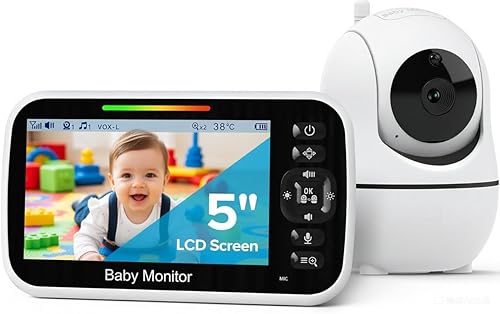
This is the unit I recommend first to any spouse asking about the best baby monitor for military families moving overseas. It uses 2.4 GHz FHSS local radio, so it works the moment you plug it in — no app, no router, no host-nation account. The 5-inch parent display has a 30-hour standby battery, which matters when you are in a TLF room with one outlet behind the bed. Pan, tilt, and zoom let you cover a Pack 'n Play, a crib, and the doorway from one camera position. The USB power input accepts any 100-240V adapter, so a $6 plug-shape converter is all you need for Germany, Italy, Japan, or Korea outlets. Range is rated around 1000 ft line-of-sight, which in practice means you can step out to the stairwell of a tower-style OCONUS apartment without losing signal. Check current price on Amazon.
Best for multi-room OCONUS quarters: HelloBaby 5-inch with 2 Cameras
Stair-step housing on Kadena, the row houses at RAF Lakenheath, and the larger units at NAS Sigonella often have nursery and toddler rooms on different floors. The two-camera kit pairs both units to one 5-inch handset and lets you split-screen or rotate views. Same no-Wi-Fi 2.4 GHz radio, same 30-hour battery, same USB power. It is also the right pick if you have twins or a baby plus a sibling who still wants a camera. You can buy a single-camera kit later and expand to four cameras total. View the two-camera bundle on Amazon.
Best budget pick for the hand-carry bag: GoodBaby No-WiFi PTZ Monitor
If your unaccompanied baggage shipment is delayed and you need a working monitor for under $80 to throw in a duffel, the GoodBaby is the cleanest budget option. It is a no-Wi-Fi PTZ camera with two-way talk, lullabies, and a temperature readout, and it runs off the same kind of USB brick you already pack for a phone. The build quality is not Nanit-tier, but it works on day one in TLF, it does not need an app store you might not have access to overseas, and it is cheap enough to leave behind with the sponsor unit if you transfer mid-tour. A solid stopgap. See the GoodBaby on Amazon.
Best smart monitor for on-base Wi-Fi housing: Nanit Pro 1080p with Floor Stand
Once you have moved into permanent on-base housing with stable Wi-Fi — most Air Force and Navy installations in Europe and Japan now meet this bar — the Nanit Pro becomes useful as a secondary cam. The overhead floor-stand angle gives you breathing-motion tracking without a wearable, sleep stage analytics, and clean 1080p night vision. The killer feature for military families is multi-caregiver access: a deployed spouse, a grandparent in Texas, and the parent at home can all view the same feed without sharing a login. The floor stand also breaks down small enough to ride in a household goods crate without damage. Treat it as your smart layer on top of the HelloBaby, not a replacement. Check Nanit Pro pricing on Amazon.
Best for health-data parents and NICU graduates: Owlet Dream Duo (Gen 3)
For families whose infant is a NICU graduate or who simply want pulse and oxygen trend data alongside video, the Owlet Dream Duo bundles the Dream Sock with a 2K HD camera. The Dream Sock itself works without internet for local alerts, which is the part that matters when you are between routers in a TLF. The video stream and the long-form sleep data do require Wi-Fi, so plan around that. Bring it OCONUS only if your destination has confirmed on-base Wi-Fi or if you are willing to pay for a host-nation broadband line during your first month. For a deeper breakdown of wearable health monitors, see our Owlet vs Nanit comparison. View the Owlet Dream Duo on Amazon.

How to pack and power your monitor on a PCS flight
Put the parent handset, one camera, and a USB-C or micro-USB cable in your hand-carry. The Patriot Express and most commercial carriers allow lithium-ion devices in carry-on only, and you do not want your only monitor sitting on a pier in Bremerhaven for six weeks. Pack the second camera, any wall mounts, and the floor stand in unaccompanied baggage. Bring two universal travel adapters rated for at least 6A — one for the monitor, one for the bottle warmer.
Do not buy a step-down voltage transformer for a USB-powered monitor. Modern 5V USB bricks already accept 100-240V; you only need a plug-shape adapter. Step-down transformers are heavy, hot, and only relevant for older 110V-only appliances like some sound machines. If your existing sound machine is 110V-only, replace it before you fly rather than carrying a transformer for one device.
What to skip when buying for OCONUS
Skip any monitor that requires a cellular SIM, anything marketed as "works with Alexa" without a local viewing mode, and anything that streams exclusively to a manufacturer cloud in the US — overseas latency and host-nation firewalls will make those unusable. Also skip monitors with non-replaceable batteries on the parent unit unless they offer at least 12 hours of runtime; replacement is hard to source overseas, and AAFES/NEX exchanges rarely stock the right cells.
Frequently Asked Questions
Will a US baby monitor work in Germany, Italy, or Japan?
The camera and handset run on 5V USB, which is universal, so the device itself works anywhere. The wall plug shape changes, so you need a cheap plug adapter — not a voltage converter — for Type F (Germany, Italy partially), Type L (Italy), or Type A/B (Japan, which is 100V and compatible with US plugs). The 2.4 GHz radio is legal across Europe, Japan, and Korea for these consumer monitors.
Do I need a no-WiFi baby monitor for military housing overseas?
Strongly recommended as your primary system. On-base Wi-Fi exists at most installations but is often not connected on move-in day, and host-nation ISPs can take 30 to 60 days to install service in off-base rentals. A no-Wi-Fi monitor works from minute one in TLF, in your sponsor's spare room, and in your permanent quarters before the router shows up.
Can a deployed spouse view the baby monitor from downrange?
Yes, if you are using a Wi-Fi monitor like the Nanit Pro or Owlet Dream Duo and the deployed location allows personal device internet (most MWR-supported sites do). Multi-caregiver invites let the deployed parent see the same feed without sharing your main account. Bandwidth at the downrange end is the usual bottleneck, not the camera.
How do I pack a baby monitor for the Patriot Express?
Lithium-ion handset and one camera go in your carry-on, per TSA and AMC rules. Mounts, floor stands, and the second camera ride in checked or unaccompanied baggage. Keep the original box if you can — it makes inspection at customs and at the receiving station faster.
Is the Nanit Pro worth bringing OCONUS in 2026?
Yes, but as a second layer. The sleep analytics and overhead view are genuinely useful, and the floor stand survives an HHG shipment if packed in its original box. Pair it with a local no-Wi-Fi monitor so you are covered before your router arrives and during any host-nation internet outages.
What about radio frequency restrictions in Japan or Korea?
The 2.4 GHz band used by HelloBaby, GoodBaby, and Nanit is allocated for unlicensed consumer use in Japan (under MIC rules) and Korea. You do not need a separate permit. Avoid older 900 MHz-only monitors, as that band is regulated differently overseas.
Should I buy a second monitor at my OCONUS exchange after arrival?
Usually no. AAFES and NEX exchanges stock a thin selection, prices run higher than Amazon with APO shipping, and warranty support is awkward. Buy the monitor stateside before you fly, or order to your APO/FPO address once you have the box — APO ground shipping through Amazon is free on Prime-eligible items and typically arrives in 10 to 14 days.
For more on building a portable nursery setup, see our guide to travel-friendly nursery essentials.
Key Takeaways
- Choosing the right best baby monitor for military families moving overseas means matching capacity and output ports to your actual devices
- Always check actual watt-hours (Wh), not just watts — runtime depends on Wh, not peak output
- Also covers: baby monitor for PCS move with infant
- Also covers: dual voltage baby monitor for overseas military
- Also covers: baby monitor for military families abroad
- Compare price-per-Wh across models to find the best value for your budget