Specification and Compatibility Table
| Model | Network | Camera / Resolution | Screen | Night Vision | Mount | Battery | Price |
|---|---|---|---|---|---|---|---|
| Nanit Nursery Bundle | WiFi | 1080p HD | App (not stated) | Yes | Floor stand | Not stated | $246.35 |
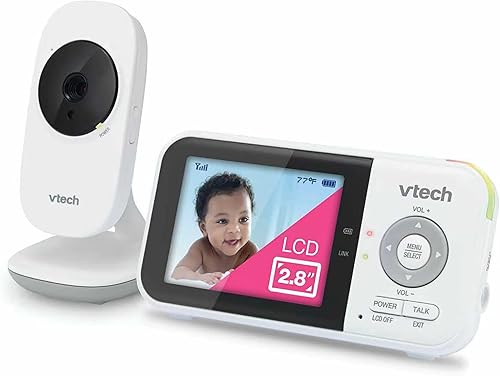
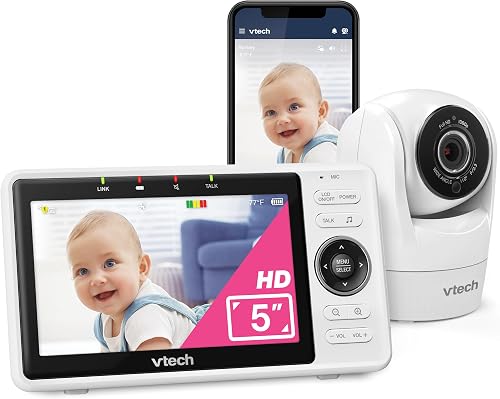
| VTech VM901 | WiFi | 1080p, pan-tilt-zoom | 5 inch | Yes | Not stated | Not stated | $111.98 |
| Dr.Care LumiView Max | WiFi | 1080P FHD & 2K | 7 inch | HD night vision | Not stated | 6000mAh removable | $159.99 |
| Nanit Smart Baby Monitor System | WiFi | Crystal-clear video (res not stated) | 8 inch display | Not stated | Wall mount | Not stated | $399 |
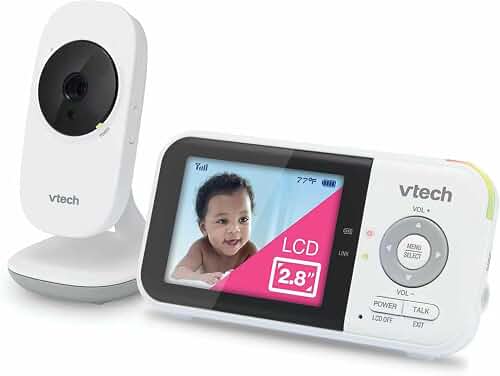
| VTech VM819 | No WiFi | Video (res not stated), 1000ft range | Yes (sound-activated) | Yes | Not stated | 19-hour video | $45.49 |
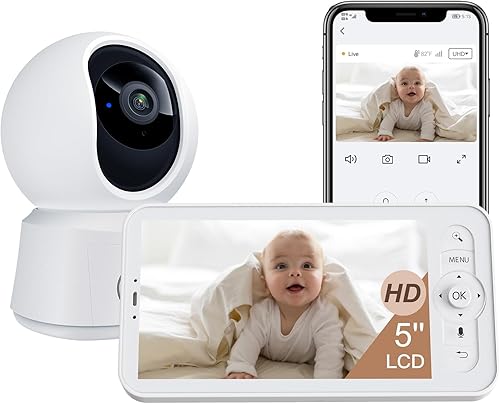
| ARENTI B2 Kit | WiFi (encrypted) | Auto-tracking (res not stated) | 5 inch | Super night vision | Not stated | Not stated | $79.99 |
Last Updated: July 28, 2026
The Short Answer
Choose the monitor around your nursery's constraints, not its feature list. Decide first whether you want a WiFi/app monitor or a self-contained local-radio unit, then confirm the camera can mount where you actually have a clear line to the crib, has night vision that reaches that distance, and fits your WiFi and privacy comfort level. Everything else, screen size, lullabies, sleep tracking, is a preference you layer on after those three constraints are settled.
Why "Setup" Comes Before "Features"
Most disappointing baby monitor purchases fail on a physical or network detail, not on a missing feature. The camera can't see the whole crib, the WiFi drops in the corner of the house where the nursery sits, or the parent unit dies overnight because it was never designed to run to morning.
Finding the right how to choose a baby monitor for your nursery setup comes down to matching the features to how you will actually use it.
So the decision order matters. Nail the network model, the mounting geometry, and the low-light performance first. Those three cannot be fixed with a firmware update after the box is open. Screen size, two-way talk, and sleep insights can all be worked around or ignored; a camera that physically can't frame the crib cannot.
WiFi App Monitors vs Local-Radio Monitors
A WiFi monitor streams to your phone and often to a dedicated display, and it needs a stable home network and an account. A local-radio monitor pairs a camera directly to a handheld parent unit with no internet, no app, and no account. Neither is universally better; they suit different nurseries.
If your nursery has weak WiFi, or you simply do not want a nursery camera on the internet, a non-WiFi unit like the VTech VM819 sidesteps the whole network question. If you want to check the room from work or share access with a partner, a WiFi model like the VTech VM901 or ARENTI B2 Kit is the category you want.
Step-by-Step: Match a Monitor to Your Room
- Map your line of sight to the crib. Stand where a camera could realistically mount and check you can see the entire mattress, not just the head. Gotcha: a shelf mount two feet from the rail often frames only half the crib. A wall mount or floor stand placed back and slightly above the rail gives the fuller angle. The Nanit bundles ship with dedicated mounting hardware for exactly this reason.
- Measure the mount-to-crib distance for night vision. Infrared night vision fades with distance. Gotcha: a camera that looks crisp across a small room in daylight can go grainy in the dark at the same distance. If the room is large, prioritize a model that specifically calls out strong low-light performance, such as the ARENTI B2 "Super Night Vision" or the Dr.Care LumiView Max HD night vision.
- Test WiFi at the exact mount point, not the doorway. Walk your phone to the wall where the camera will live and run a speed test. Gotcha: signal at the nursery door can be strong while the far corner behind the crib is dead. If it is weak, either move a mesh node closer or choose a non-WiFi unit.
- Confirm the power run. WiFi cameras generally need to stay plugged in; a wall or floor mount must reach an outlet without a cable dangling into the crib. Gotcha: keep all cords well outside the arm's reach of a standing toddler. Battery models like the Dr.Care (6000mAh removable) or VM819 (19-hour video battery) give you placement freedom but must be recharged on a schedule.
- Decide how you will watch: phone, dedicated screen, or both. Gotcha: app-only monitoring means your phone is the monitor, with its notifications and battery drain. If you want a screen that stays in the bedroom, pick a model that includes one, like the VM901 (5 inch), ARENTI (5 inch), Dr.Care (7 inch), or the Nanit 8-inch display system.
- Set privacy before the baby ever uses it. On a WiFi model, change any default password, enable two-factor if offered, and learn where the privacy toggle is. The Dr.Care lists a Privacy Mode and the ARENTI advertises an encrypted connection; know how to use those on day one.
- Do a full overnight dry run before you rely on it. Run the monitor for one real night with no baby in the room. Gotcha: this surfaces the parent-unit battery life, false motion alerts, and any overnight WiFi drop before it matters.
What Goes Wrong, and What to Do About It
The camera only shows half the crib
Symptom: baby rolls to the foot of the mattress and disappears from frame. Cause: mount too low or too close. Fix: raise and pull the camera back, or switch to a wall or floor mount that clears the crib rail. A pan-tilt-zoom camera like the VM901 lets you re-aim remotely instead of climbing a ladder each time.
Night video is grainy or washes out
Symptom: usable picture in daylight, unusable in the dark. Cause: infrared range is shorter than your mount distance, or a night light is confusing the sensor. Fix: move the camera closer, disable competing light sources, or choose a model that specifically calls out HD or "super" night vision.
The app keeps dropping or lags
Symptom: buffering, "reconnecting," or delayed alerts. Cause: weak WiFi at the camera or an overloaded network. Fix: add a mesh node near the nursery, put the camera on the closer band, or accept that a non-WiFi unit is the more reliable answer for that room.
Too many false alerts, or none at all
Symptom: motion and cry notifications fire at every shadow, or stay silent through real crying. Cause: default sensitivity does not match your room. Fix: tune the detection sensitivity in the app and re-test. Models that separate cry detection from motion detection, like the Dr.Care, give you finer control.
The parent unit dies before morning
Symptom: black screen at 4 a.m. Cause: battery undersized for all-night use, or a power-saving screen mode misunderstood. Fix: keep the unit docked overnight, or use a sound-activated screen mode like the VM819's so the display sleeps until noise wakes it. Confirm real runtime in your overnight dry run.
Privacy worry after the fact
Symptom: unease about a camera streaming to the cloud. Cause: default settings left wide open. Fix: change the password, enable encryption or privacy mode, and prefer local storage if the model supports it, as the ARENTI does. Check current recall and safety notices at the CPSC recalls page before you buy any connected nursery device.
Where the manufacturer data provided did not list a value, the table reads "Not stated" rather than a guess. Confirm any spec that is critical to your room, especially resolution and battery runtime, on the current product listing before buying.
When the Fix Is a New One
Keep working on placement and settings first. But some limits are structural, and no amount of re-aiming solves them. Here are the honest signals that a different unit is the real fix, matched to what each one changes for the task.
Your nursery WiFi will never be reliable
If you have tested the mount point and the signal is genuinely weak, stop fighting the network. The VTech VM819 pairs its camera directly to the parent unit with no WiFi and a 1000ft range, and its sound-activated screen and 19-hour video battery are built for overnight use. It changes the task from "stabilize a network" to "just watch the room."
You can't get a clean angle from a fixed spot
If nothing you own gives a full-crib view, a remote-steerable camera solves the geometry. The VTech VM901 adds pan-tilt-zoom with a 5-inch dedicated screen, so you re-aim from the parent unit instead of relocating hardware every time the baby moves.
You need privacy control and flexible placement
If cloud-only streaming is the sticking point, a model with an encrypted connection and local storage changes the privacy math. The ARENTI B2 Kit pairs those with auto-tracking, a 5-inch display, and super night vision, so you keep footage local while still getting app access.
FAQ
Do I need a WiFi baby monitor, or is a non-WiFi one enough?
You need WiFi only if you want to view the room from your phone or from outside the house, or share access with another caregiver. If you just want to watch and hear the crib from another room, a non-WiFi unit like the VM819 does that with no network dependency.
Where should I mount the camera relative to the crib?
Mount it back and slightly above the rail so the frame covers the whole mattress, and keep every cord well outside the crib and out of a standing child's reach. A wall mount or floor stand usually beats a nearby shelf for a full-crib angle.
How far can baby monitor night vision actually reach?
Infrared range varies by model and is rarely a single published number, so treat the mount-to-crib distance as the test. If the picture is grainy in the dark at your real distance, move the camera closer or choose a model that specifically advertises HD or super night vision.
Are WiFi baby monitors safe from being accessed by strangers?
They are far safer once you change the default password, enable two-factor and any encryption or privacy mode, and keep firmware updated. Models advertising encrypted connections or local storage reduce cloud exposure, but the settings still have to be turned on by you.
What screen size do I need, and do I even need a screen?
If you are comfortable using your phone as the monitor, an app-only or app-plus-camera setup works. If you want a dedicated display that stays in the bedroom, options in this data range from a 5-inch unit up to a 7-inch and an 8-inch display; larger screens are easier to read at a glance but take more nightstand space.
Should I trust owner reviews when choosing?
Reviews are worth reading, but verify them yourself against the current listing rather than relying on any summary. Check the recent reviews on the product page for your specific concern, whether that is battery life, night vision, or app stability, since firmware and hardware revisions change over time.
Key Takeaways
- Choosing the right how to choose a baby monitor for your nursery setup means matching the key features to your specific needs and budget
- Read real customer reviews and check the return policy before you commit
- Also covers: wifi vs non-wifi baby monitor
- Also covers: baby monitor mounting placement
- Also covers: baby monitor night vision range
- Compare value across models — the priciest option is not always the best fit